 https://mulderdev-docs.pages.dev/
 Join our Discord
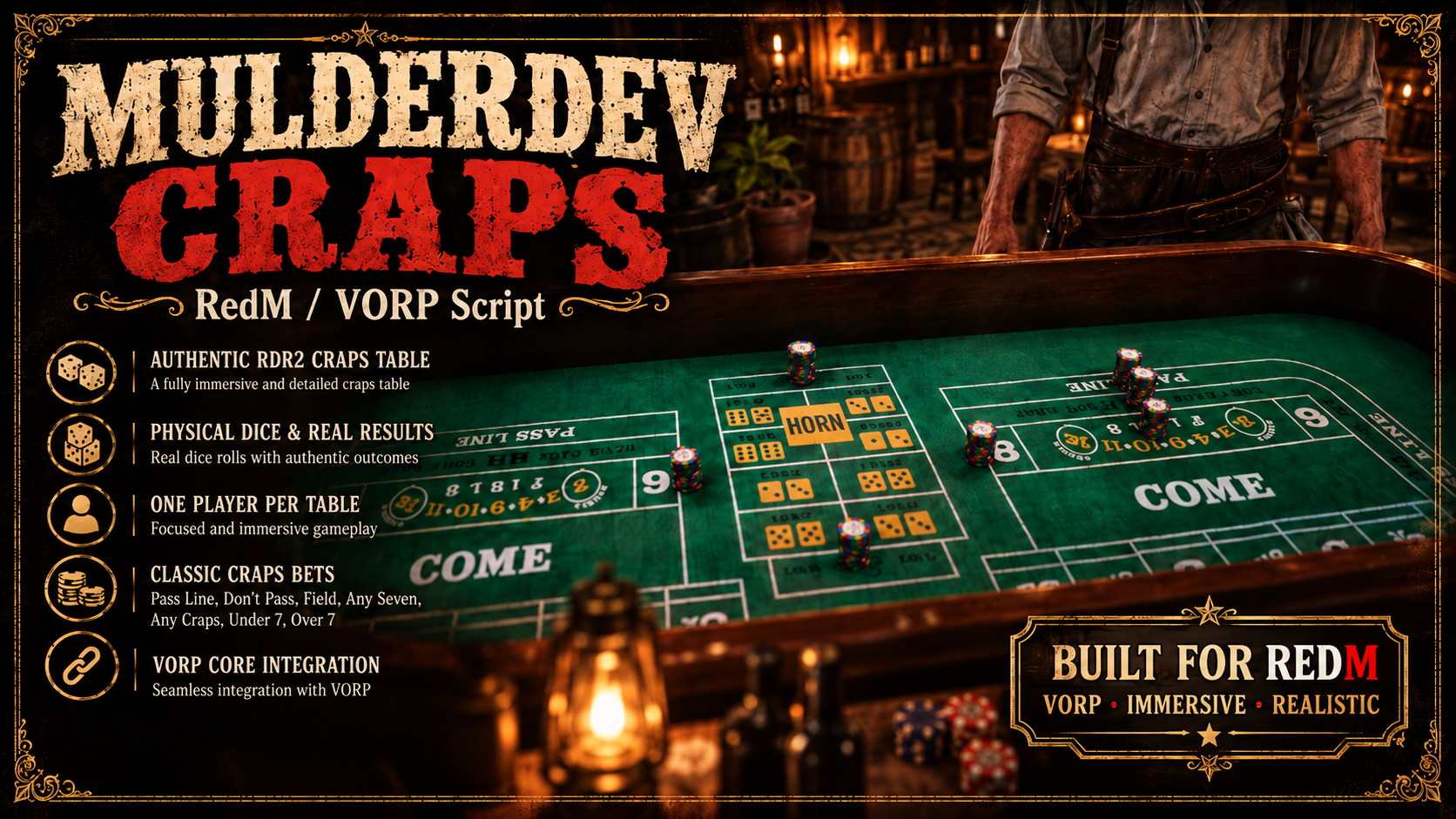
MulderDev Craps – RedM / VORP
Bring a fully interactive Western Craps experience to your RedM server.
MulderDev Craps combines authentic RDR2-style table props, physical 3D dice, classic Craps betting rules and a cinematic interface into a complete gambling system built for VORP Core.
Players take a seat at a real Craps table, place their bets, become the shooter and physically roll the dice across the felt.
🎲 Authentic Craps Gameplay
The system includes the traditional Come-Out Roll and Point Phase, including the standard point numbers:
4 • 5 • 6 • 8 • 9 • 10
Supported bets include:
-
Pass Line — 1:1
-
Don't Pass — 1:1
-
Field Bet — 2, 3, 4, 9, 10, 11 and 12 with payouts up to 3:1
-
Any Seven — 4:1
-
Any Craps — 7:1
-
Under 7 — 1:1
-
Over 7 — 1:1
Every wager is handled individually, including bets that remain active during an ongoing Point round.
🎲 Physical 3D Dice
MulderDev Craps doesn't rely on a simple random-number popup.
The script uses the native RDR2 dice prop:
p_dice01x
Dice are physically animated across the table and display the corresponding result directly on the felt, creating a much more immersive casino experience.
The table itself uses the authentic RDR2 Craps prop:
p_crapstable01x
💰 Physical Betting Chips
Placed bets are represented directly on the table using visible chip stacks.
Dedicated positions are available for:
Pass Line • Don't Pass • Field • Any Seven • Any Craps
Because the original RDR2 table does not contain dedicated areas for Under 7 and Over 7, these bets are positioned on unused felt areas beside the central betting section and clearly labelled.
Chip positions can be adjusted through:
Config.ChipZones
👤 Independent Tables
Each Craps table operates independently.
Only one player can actively occupy a table at a time, while other configured Craps tables remain available for other players.
A player can only participate at one table simultaneously, preventing duplicated sessions or conflicting bets.
🎥 Cinematic Table Experience
Players can switch between multiple perspectives while playing:
-
Table overview
-
Shoulder camera
-
Free player camera
Camera modes can be switched at any time with C.
The mouse remains available for interacting with the betting interface.
💵 VORP Core Integration
All money handling is processed securely on the server.
Choose whether your tables operate with:
Dollars
Deposits, payouts and returned wagers are calculated and validated server-side.
📊 Detailed Result Overview
After every roll, players receive a clear personal settlement overview showing:
-
Total wagered amount
-
Net result
-
Payout
-
Returned stakes
-
Individual bet results
-
Bets that remain active during the current Point phase
The previous settlement remains accessible through the interface and automatically collapses once the next betting phase begins.
🌍 English & German
Built-in localization support:
Config.Locale = 'de'
or
Config.Locale = 'en'
The selected language changes:
-
Interface
-
Help messages
-
Results
-
Betting information
-
Gameplay notifications
The original printed texture of the RDR2 table remains unchanged.
⏱️ Configurable Game Timing
Server owners can control the pace of each game.
Config.BetSeconds
Controls the betting phase duration.
Config.RollSeconds
Controls the countdown before the automatic dice roll.
Both timers are displayed directly inside the betting interface.
🎮 Controls
Key
Action
G
Join table / Confirm wager
Q / E or ← / →
Switch betting type
↑ / ↓
Adjust wager
SPACE
Roll the dice when you are the shooter
C
Switch camera
BACKSPACE
Leave the table
🛠️ Admin Tools
MulderDev Craps includes helper commands for configuring additional tables.
/crapspos
Displays the player's current coordinates and heading in both chat and F8 format, making it easy to add new tables to config.lua.
/crapsturn
Rotates the current Craps table directly in-game.
Example:
/crapsturn 15